
Edits: Video Editor
InstagramVideo Players & Editors
4.75.28K Reviews
- Version
- 452.0.0.50.64
- Installs
- 100.00M
- Age Rating
- Everyone
Screenshots
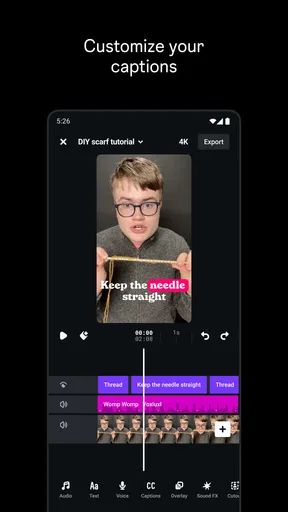
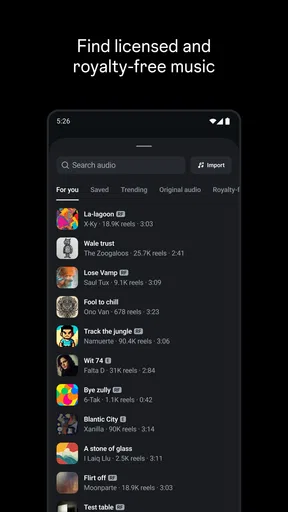
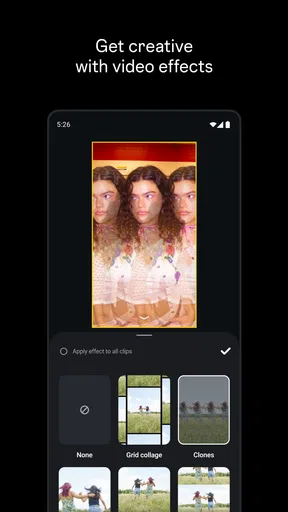
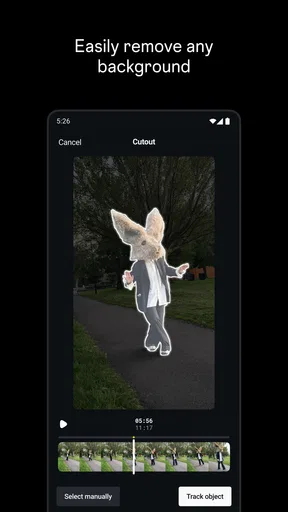
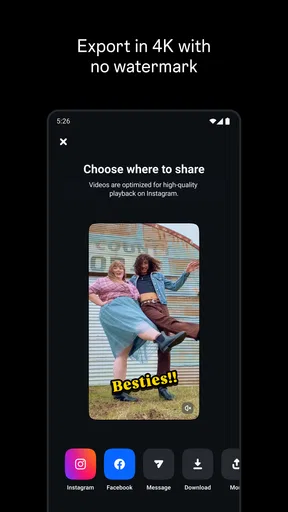
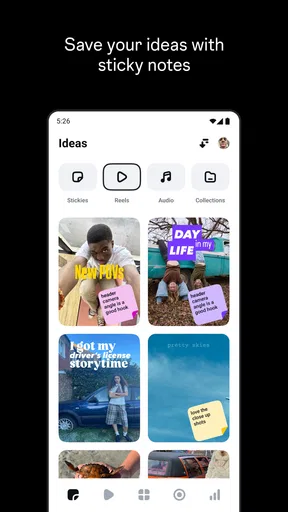
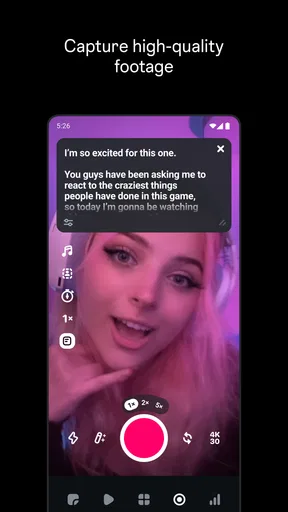
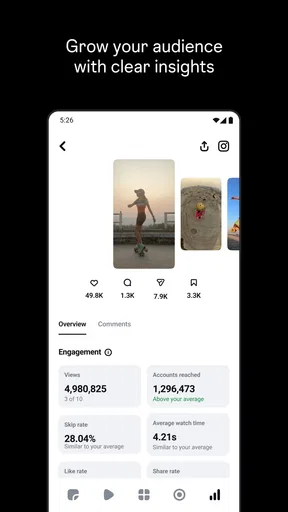
Our Review of Edits: Video Editor
 Analysis by Appyee
For quick Instagram-focused video work, Edits makes more sense as a convenient creative workspace than as a replacement for every editor on your phone. I like the idea of keeping a short project close to the place where I plan to share it: fewer handoffs can make posting feel less like a chore. The trade-off is that a focused tool may not suit someone who wants a deep, all-purpose editing suite.
Where it fits in a creator’s routine
Instagram developed this free video-editing app, which belongs to the video players and editors category. Its short description is simply “Edits,” while the store summary presents it as a video maker from Instagram. That framing gives me a useful expectation: it is aimed at making social video, rather than serving as a general media player or a full production studio.
A practical way to judge it is to start with the kind of clip you already make. If I have a few moments from a walk, a meal, or a small project and want to turn them into a post, a dedicated mobile editor can help me move from raw footage to a shareable result without opening a desktop program. For a long interview, a carefully arranged travel film, or work that needs detailed audio and color control, I would first compare it with a more specialized editor.
That distinction matters because “easy to start” and “powerful enough for every project” are not the same thing. I would use Edits for the first draft of a casual social video, then decide whether the result needs more control. Having that boundary in mind prevents disappointment: the app is most appealing when the job is modest, the phone is already in hand, and publishing to Instagram is part of the plan.
A useful everyday workflow
Picture a simple afternoon: I record a few short clips while making lunch, then want to share the finished moment without turning it into a production. I would sort out the story first—what should open the video, which detail earns a closer look, and what can be left out—before spending time on effects. That small planning step is useful in any mobile editor, but especially when the goal is a quick, coherent post rather than a polished film.
My practical tip is to make a rough cut before choosing a visual style. Once the sequence makes sense, I can judge whether it needs a treatment at all. This avoids the common trap of letting an effect distract from unclear footage. I would also watch the result once with the phone’s sound on and once with the sound off; a social clip should still communicate its basic point if someone is scrolling without audio.
For anyone preparing several related posts, consistency is more valuable than making every clip look dramatic. I would pick a restrained visual direction and apply it deliberately, rather than changing the look from shot to shot. This kind of editorial discipline is a better route to a recognizable feed than adding more decoration, and it helps reveal whether the app’s available controls are enough for the job.
What to consider before choosing it
Edits has a 4.6 average from around 542 thousand ratings, and it has been installed over 10 million times. Those figures suggest that many people have tried it, but they do not tell me whether its workflow suits a particular creator. I would treat them as context, not as a promise that every tool or export will fit my needs.
The app is free and rated for everyone, which makes it easy to try without making a purchase decision first. It was released on April 21, 2025, and version 410.0.0.62.71 is listed for devices running Android 9 or later. If I were considering it for an older phone, I would check the operating-system requirement before planning a workflow around it.
One question I would ask before settling on any editor is whether it supports the amount of control I need over a project. A lightweight social workflow is convenient, but it can become frustrating if I regularly want intricate timelines, precise audio adjustments, or a particular finishing style. In that case, a more established general-purpose mobile editor—or a desktop program—may be a better fit, even if it adds extra steps before posting.
Let's dive into the world of Edits, an Instagram app that’s been catching quite a buzz lately. I’ve spent some time tinkering with it, and let me tell you, it’s got some pretty neat tricks up its sleeve!
First Impressions
So, when you first open Edits, it greets you with a sleek and intuitive interface. No clutter, just what you need right where you need it. It's like the app gets me! You know when you open an app and instantly feel like you’re in the right place? Yeah, that’s what happened here.
Main Features
Now, let’s talk about what you can actually do with this app. The main draw here is its editing capabilities specifically tailored for Instagram. Whether you’re sprucing up your selfies or perfecting that sunset shot, Edits offers a range of tools that make the process fun and easy.
There’s a nifty filter collection that feels like a breath of fresh air. Unlike the usual suspects, these filters are unique and add a professional touch to your photos. And if you’re feeling creative, you can tweak the intensity to suit your vibe.
Why It Stands Out
One feature that I really appreciate is the batch editing option. For those of us who love sharing photo dumps but dread the editing marathon, this is a lifesaver! You can apply the same edit across multiple photos, and voilà, you’re done!
Another cool feature is the story templates. I mean, who doesn’t want their stories looking all snazzy? With customizable layouts and fun fonts, your stories can go from drab to fab in seconds. And trust me, your followers will notice!
Room for Improvement
While I’m loving the app, there are a couple of things I wish were a bit different. The app sometimes takes a little longer to load when you’re dealing with high-res images. It’s not a deal-breaker, but something to keep in mind if you’re in a hurry.
Also, while the free version of the app is pretty generous, some of the premium features are locked behind a paywall. If you’re a casual user, the free version should suffice, but if you’re serious about your Instagram game, you might want to consider upgrading.
Final Thoughts
All in all, Edits has quickly become a staple in my app arsenal. It’s user-friendly, effective, and packed with features that cater to both casual users and Instagram aficionados. If you’re looking to up your Insta game, this app is definitely worth a try.
So go ahead, give it a whirl! You might just find it’s the Instagram companion you never knew you needed.
Who I’d recommend it to
I’d point casual Instagram posters toward Edits if they want to make a short video without turning editing into a separate hobby. It also makes sense for someone who posts regularly and values a repeatable routine: sketch the idea, assemble the footage, make a few deliberate choices, and move on. For a small business owner sharing a quick behind-the-scenes clip, for example, that lower-friction process may matter more than having every professional control.
I would be more cautious about recommending it to people whose work depends on exact timing, layered sound, fine color adjustments, or a long sequence of shots. Those creators may prefer an editor built around detailed timeline work. Likewise, if most of your creative work is still photography rather than video, a video-maker’s workflow may not be the right center of your toolkit; choose the app that matches the material you actually make.
There is also a useful middle ground: keep Edits for spontaneous posts and use another editor when a project grows beyond a simple social clip. Switching tools is not a failure. It is a sensible way to avoid spending time forcing a focused app to handle a job that needs a different kind of control.
Small decisions that improve the result
Before recording, I would decide what the viewer needs to understand in the first moment. A clear opening is more useful than a pile of effects, especially for a clip watched while someone is scrolling. I would capture a couple of alternative shots when convenient, too; having a choice between a wide view and a closer detail can make the edit feel intentional without adding complexity.
I would also keep the original clips until I am satisfied with the final version. That gives me room to reconsider the sequence or try a different presentation instead of treating the first edit as permanent. For repeat content—say, a weekly progress update—I would make a simple visual checklist for myself, such as a similar opening shot and a consistent pace. That creates continuity even when the footage changes.
One trade-off of editing on a phone is that the small screen can make fine decisions harder to judge. I would preview the entire video rather than judging each cut in isolation, and check text placement against the edges before posting. A clip can look tidy while editing but feel cramped when viewed in context, so a full playback is a worthwhile last step.
How it compares with other editors
Compared with editing directly inside a social app, a separate editing space can be appealing when I want to shape the clip before I think about the final post. Compared with broad mobile editors, Edits has a clearer Instagram connection, while a general-purpose alternative may be a better choice if I need a more elaborate production workflow. The right comparison is not which app has the most buttons; it is which one gets my particular video finished with the least friction.
If I need a quick, platform-minded result, I would try Edits first. If I need detailed control, I would test a more capable editor on the same short project and compare how comfortable the timeline and finishing steps feel. That trial is more informative than choosing by reputation alone: a feature-rich tool is not automatically faster, and a simple one is not automatically limiting for every creator.
For a first project, I would use footage I can afford to experiment with rather than an important one-off recording. That lets me learn the workflow, find any points that slow me down, and decide whether the app suits my habits. The first question is not whether it can make a flashy video; it is whether I can make the kind of video I actually want to share without fighting the process.
My verdict
My recommendation is straightforward: try Edits if Instagram is where your short videos are headed and you value a direct, approachable way to shape them. Its free price makes it an easy option to evaluate, and the app has broad reach, with over 10 million installs and around 542 thousand ratings. Those figures are useful background, but the best test is still a small project of your own.
I would not choose it automatically for every editing job. High-resolution material can take longer to load, and a creator who wants deeper production controls may be happier elsewhere. I also would not assume that every capability is included at no cost: the original experience includes a generous free offering, while some premium features sit behind a paywall. Check the choices shown in the app before building a workflow around paid tools.
For everyday social clips, though, I like the promise of getting from an idea to a shareable video without making the process feel like a production assignment. If that is the kind of help you want, Edits is worth trying. If you regularly outgrow simple mobile editing, treat it as a convenient starting point rather than your only editor, and choose a more specialized tool when the project calls for it.
Privacy and Permissions
See what permissions an app requests and how it handles your data.
- Identity
- find accounts on the device, read your own contact card
- Contacts
- find accounts on the device, read your contacts
- Location
- precise location (GPS and network-based)
- Phone
- directly call phone numbers, read phone status and identity
- Photos/Media/Files
- read the contents of your USB storage, modify or delete the contents of your USB storage
- Storage
- read the contents of your USB storage, modify or delete the contents of your USB storage
- Camera
- take pictures and videos
- Microphone
- record audio
- Wi-Fi connection information
- view Wi-Fi connections
- Device ID & call information
- read phone status and identity
- Other
- view network connections, pair with Bluetooth devices, allow Wi-Fi Multicast reception, full network access, change your audio settings, run at startup, draw over other apps, use accounts on the device, control vibration, prevent device from sleeping
Verdict
Strengths of Edits: Video Editor
- User-friendly interface with intuitive design.
- Wide range of filters for creative editing.
- Seamless integration with Instagram posts.
- Fast performance with minimal lag.
- Regular updates with new features.
Limitations of Edits: Video Editor
- Limited options for video editing.
- Requires in-app purchases for premium tools.
- No offline editing capabilities.
- Occasional crashes on older devices.
- Limited support for non-Instagram sharing.
Other Releases by Instagram
View All


Similar Picks in This Category
View All
Google TV
Google LLC3.9

iTunes
Apple4.7

YouTube
Google LLC3.8

MX Player
Amazon Mobile LLC4.2

CapCut - Video Editor
Bytedance Pte. Ltd.3.5

PLAYit-All in One Video Player
PLAYIT TECHNOLOGY PTE. LTD.4.5
Frequently Asked Questions
What is Edits, and how does it enhance my Instagram experience?
Edits is a versatile app designed to elevate your Instagram experience by offering advanced editing tools and features. It provides a range of filters, effects, and customization options, allowing users to create visually stunning posts and stories. Whether you're a casual user or a content creator, Edits offers tools that make your Instagram feed stand out.
Is Edits user-friendly for beginners who are new to photo editing?
Yes, Edits is designed with a user-friendly interface that caters to both beginners and advanced users. It features intuitive controls and easy-to-follow tutorials that help new users navigate the app quickly. Even if you're new to photo editing, you’ll find the app straightforward and easy to use, ensuring a smooth editing experience.
What unique features does Edits offer compared to other Instagram editing apps?
Edits stands out with its advanced customization tools, including AI-powered enhancements, exclusive filters, and precision editing options. It also offers batch processing and supports high-resolution exports, which are not commonly found in other editing apps. These features make Edits a preferred choice for users looking for professional-level editing capabilities on their mobile devices.
Does Edits require a subscription, or is it free to use?
Edits offers a free version with basic features, but a subscription is required to unlock its full potential. The premium subscription provides access to exclusive filters, advanced editing tools, and ad-free usage. Users can choose from various subscription plans to fit their budget and needs, ensuring everyone can enjoy the app's benefits.
Are there any privacy concerns when using Edits with my Instagram account?
Edits prioritizes user privacy and security. The app does not store personal information or images without user consent. It uses secure connections to interact with Instagram, ensuring that your data remains safe. Users can review the app's privacy policy for more details on how their information is handled, providing peace of mind while using the app.
